Furniture and home5 min read
Placing several decor items in one room with AR, and where it falls apart
Phone AR is good at one object at a time. What happens when a shopper tries to plan a whole room, and what to build instead.
By CharpstAR · 21 Mar 2023 · Updated 22 Sept 2026
Part of Augmented reality for furniture retail: the complete guide
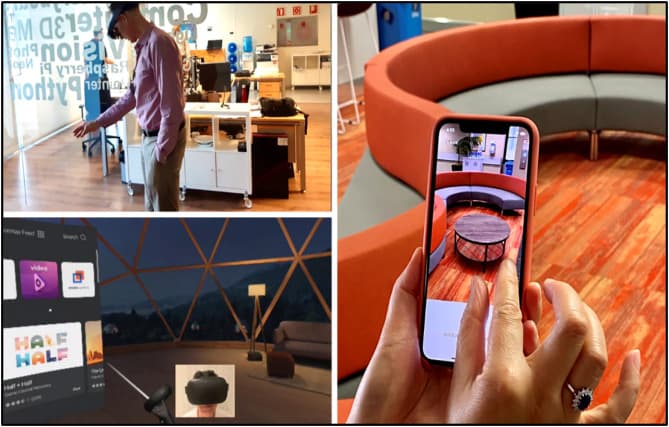
Most writing about AR for home decor stops at one object. Place the lamp, see the lamp, buy the lamp. That is the part that works reliably. The interesting and much less discussed question is what happens when a shopper wants to place four things at once and see whether they go together, because that is what decorating actually is.
The short answer is that phone AR handles multi-object placement worse than people expect, for reasons that are physical rather than fixable by better software. Knowing where the line is saves you from building the wrong thing.
What one object at a time gets right
When a phone places a single model, it does a small number of things well. It finds the floor or a wall plane. It puts the model at its true size. It anchors the model to that spot so you can walk around it. It estimates the room's lighting well enough that the object does not look pasted on.
For a decor purchase this is usually sufficient, because the shopper has one question. Is this rug too big for the space between the sofa and the fireplace. Is this pendant the right diameter over this table. Does this mirror overwhelm this wall. Each of those is answered in about fifteen seconds, and answered better than any photograph could.
Where multiple objects start to break
Add a second and third object and four problems show up.
Drift. Anchors are estimates. Over a few minutes of walking around, objects slowly move relative to the real room and relative to each other. With one object you barely notice. With four arranged in a composition, the composition quietly stops being the composition you made.
Occlusion. Most phone AR does not properly understand that your real sofa is in front of the virtual side table. Objects render on top of real furniture they should be hidden behind. With one object placed in open floor space this rarely comes up. In a furnished room with several virtual items, it comes up constantly and it looks wrong.
Room mapping effort. To place things around a whole room, the phone needs a decent map of that room, which means the shopper slowly sweeping the camera across floors and walls for a while before anything useful happens. Shoppers will do fifteen seconds of this to answer a question about one product. They will not do two minutes of it on a product page.
The arm. Holding a phone up while arranging four virtual objects is genuinely tiring, and the interaction of dragging an object with one thumb while the camera moves is fiddly. This is the limit people forget because it never appears in a demo video, which is always thirty seconds long.
None of that means multi-object AR is useless. It means it belongs in a dedicated, patient context, not on a product page where the shopper is deciding about one item.
What to build instead
The split that works is this. Phone AR for the single-product question, on the product page, with no setup. A 3D room scene, viewed on the screen rather than through the camera, for the composition question.
A screen-based room scene has none of the four problems above. No drift, correct occlusion, no mapping, no arm. The shopper can put a sofa, a rug, a floor lamp and a coffee table into a room and look at them together, from any angle, with the same models that power the AR button. It is less impressive as a demo and much more useful as a tool.
| Shopper question | Best surface | Why |
|---|---|---|
| Will this one item fit here | Phone AR from the product page | True scale in the actual room, no setup |
| Does this fabric suit my light | Phone AR or in-page 3D viewer | Lighting estimation is good enough for colour judgement |
| Do these four things go together | Screen-based 3D room scene | Stable, occlusion-correct, no arm fatigue |
| Which configuration of this product | Configurator, then AR for the chosen one | Decide the variant on screen, confirm the size in the room |
That last row is the pattern we see working most often in practice. Sweef lets a shopper assemble a modular sofa on screen, where the layout decision is comfortable to make, and then hands that exact configuration to the phone for the fit question. MELIMELI does the same with upholstery, where the fabric choice happens on screen and AR confirms the scale. Contura applies it to stoves, where placement in the room is most of the decision and there is only ever one object.
The lighting caveat nobody mentions
AR lighting estimation is good, not perfect. It reads the ambient light of the room and applies something approximate to the model. For judging whether a grey sofa reads warm or cool in your north-facing living room, that is genuinely helpful. For matching a specific fabric shade to an existing piece of furniture, it is not reliable, and you should not let your marketing imply that it is.
The honest framing for a shopper is: AR shows you the size and the shape in your room with confidence, and gives you a good indication of colour. For an exact colour match, order a swatch. Brands that say this plainly get fewer angry returns than brands that promise a perfect colour preview.
What this means for your build
Do not commission a room planner as your first project. It is the expensive end and it needs a library of models to be worth anything, so it only makes sense once you already have one.
Do commission models for the products where a single-object question decides the sale, which in decor is rugs, lighting, mirrors and anything wall-mounted. Put the AR button on those pages. Then, once you have thirty or forty models, a screen-based room scene becomes cheap because the assets already exist, and that is the moment to build it.
The measurable part is the same as always: conversion and return rate on the modelled products, against the month before. Shopify's published merchant data points in the right direction, with 94 percent higher conversion on products carrying 3D or AR content in its 2020 figures, and a 5 percent return reduction at Gunner Kennels, but your own catalogue is the only number that should decide your budget.
Start with one. We will build the first model free and you keep it. Send us a product, or look at what the full service includes on the solutions page.
Sources
- Google, Scene Viewer documentation.
- Apple, AR Quick Look.
- Shopify, merchant data on 3D and AR content, September 2020.
- Shopify, AR shopping: Rebecca Minkoff and Gunner Kennels results.