Fashion6 min read
AI beauty advice plus AR try-on: what a good product page flow looks like
How to combine an AI advisor with virtual try-on on a beauty product page, in what order, and the limits worth admitting to your customers.
By CharpstAR · 4 Oct 2023 · Updated 22 Sept 2026
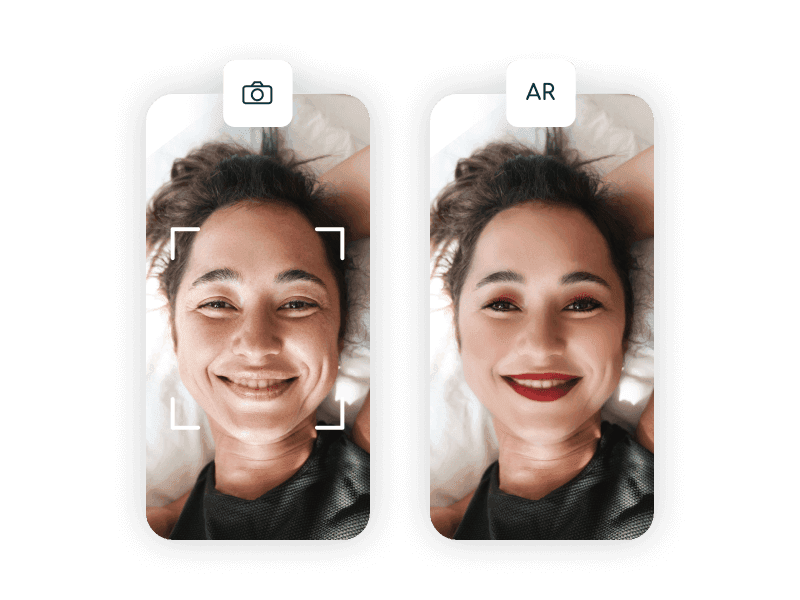
Two things have arrived on beauty product pages at roughly the same time. One is virtual try-on, which shows a product on the shopper's face through the camera. The other is an AI advisor, a chat or guided flow that asks about skin, concerns and routine and recommends products. Most brands have bolted them on separately, in different corners of the page, and the result is two half-used features instead of one working flow.
They belong together, in a particular order. This article is about that order and about the things neither of them can do, because a flow that overpromises produces a refund and a bad review.
Our position, stated up front: we build 3D models, product viewers, configurators, web AR and eyewear virtual try-on. We do not build makeup face try-on or AI beauty advisors. We are describing a category next to ours.
What the AI part is genuinely good at
An AI advisor is a conversation that ends in a shortlist. Its real value is not that it is clever. It is that it turns a catalogue of four hundred products into three, using language the shopper already has.
Shoppers do not search by ingredient. They arrive with a sentence: my skin gets oily by lunchtime but flakes on my cheeks, and I want something under a foundation. A filter system cannot take that. A good advisor can, and can also carry context across several turns, so the shopper can say "something cheaper" or "without fragrance" and keep the thread.
It also works where try-on does not. Skincare, texture preferences, routine sequencing and ingredient conflicts are all language problems rather than visual ones.
The failure mode is equally clear. An advisor that will not commit, that answers a specific question with a list of five options and a disclaimer, is worse than a well-made filter. Recommendation quality is a product decision, not a model decision: you have to be willing to say "this one".
What the AR part is genuinely good at
Try-on answers visual questions about colour products. It is very good at narrowing a shade range, and exact about geometry: where a liner sits, how wide a brow reads, whether a blush placement suits a face.
It is not exact about colour, and no amount of engineering will make it so. The phone camera applies its own white balance before the try-on sees a frame, the room light is unknown, and the shopper's screen has a colour profile of its own. The shade on screen is an indication.
There is a number that captures how hard this category is. In Shopify's write-up on AR shopping, facial complexion products carry the highest difficulty scores at 41 percent, ahead of self-tanning and body makeup at 38 percent each.
The flow that works
The order matters more than the components. Narrow first, then visualise, then confirm.
One: understand, in one or two questions. Not a fifteen-question onboarding. Two well-chosen questions, with what the shopper currently uses as the strongest single input, since it replaces self-perception with a fixed reference.
Two: recommend explicitly. One primary product, one alternative, each with one sentence of reasoning that refers back to what the shopper said. Reasoning is what makes a recommendation feel earned rather than promoted.
Three: visualise the recommendation. This is where try-on belongs, on the two or three shades that survived step two, not as a grid of forty at the top of the page. The camera prompt now arrives after the shopper is invested, which is why completion is far higher here than it is as an entry point.
Four: confirm with something that is not a render. A swatch photograph on a skin tone close to theirs, a wear-test clip, coverage and finish stated in words, reviews filtered by skin type. This is the step almost everyone skips, and it is the one that converts the shopper who is nearly sure.
Five: say what you are not sure about. A single line noting that on-screen colour varies with lighting and screens. It costs nothing, it is true, and it prevents a specific kind of disappointed customer.
| Step | Tool | What it answers |
|---|---|---|
| Understand | AI advisor, two questions | What this shopper needs |
| Recommend | AI advisor | Which two products |
| Visualise | AR try-on | Shape, placement, approximate shade |
| Confirm | Swatches, video, reviews | Texture, wear, true colour |
| Disclose | Plain copy | What the screen cannot promise |
The honest limits
Three, and each of them has a non-technical fix.
Colour fidelity is not solvable from a web page. Say so, and put real swatch photography next to the try-on.
Texture is not renderable. Nothing on a screen tells a shopper how a cream feels or how a powder behaves after six hours. Wear-test video and explicit written descriptions of finish and coverage do the job that no camera can.
An AI advisor is not a dermatologist and must not sound like one. Recommending products is fine. Diagnosing a skin condition is not, and in several markets sits close to a regulated claim. Keep the advisor in the language of suits and suggests, and route medical questions out.
There is also the privacy matter. If the camera flow sends images to a server, that is personal data in Europe and biometric-adjacent in several United States jurisdictions, and it needs an explicit consent prompt at the point the camera opens, a stated retention period and a real deletion path. On-device processing removes most of the exposure and is technically normal. Ask your lawyer before you launch, not after.
Why this is worth the work
Interactive product content converts. Shopify's merchant data from September 2020 found that interactions with products carrying 3D or AR content converted 94 percent more often than comparable products without. In Shopify's AR shopping write-up, Rebecca Minkoff reported shoppers were 44 percent more likely to add to cart and a 65 percent purchase lift on AR-enabled pages, and Gunner Kennels cut return rates by 5 percent. Different categories, same mechanism: a shopper who has engaged with the product commits more readily and regrets it less.
The part of a beauty catalogue nobody has touched
Every beauty brand sells things with no shade question at all. Styling tools, devices, brush sets, refill systems, gift boxes, applicators. For those, the shopper's question is physical, and a 3D model answers it exactly: rotate it in the page, see it at true size through the phone camera, read the dimensions off the model itself.
This is what we build. MELIMELI uses a configurator so a new material is a texture on an existing model rather than a new photo shoot. Sweef lets shoppers assemble a configuration themselves instead of asking customer service. Contura lets them place a product in their own room at real scale before ordering. The economics transfer directly to a beauty catalogue with many variants.
Send us one product and we will build the model and put it in a live viewer for free. You keep it either way: free sample. The solutions page has the rest, and prices are published.